 HOME
HOMETo set up a recurring RSS campaign you need an RSS-compatible email template. That means the template HTML must contain tags to define how text and images from your website content will be formatted in the email.
If none of your existing templates contain RSS tags you'll be prompted, when setting up the email, to create one. If you have permission, you can either code your own RSS template, or use our RSS template builder. Otherwise, you'll see a message to contact your account administrator to set one up for you.
Use the RSS template builder
The RSS template builder can only be accessed when setting up an RSS campaign. When you reach the step of choosing an email template, that's when you'll see the option to import your own, or use the builder.

In the builder, use the editing toolbar on your left to change fonts, customize colors for different elements, and edit the header and footer areas of your template.
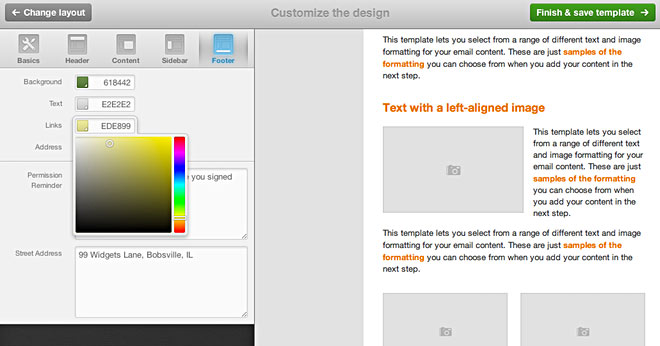
Open the Header menu to swap the text title for an image header, or to switch off social sharing links that are displayed above the header text or image.
The Content menu also includes a control to set the article length:
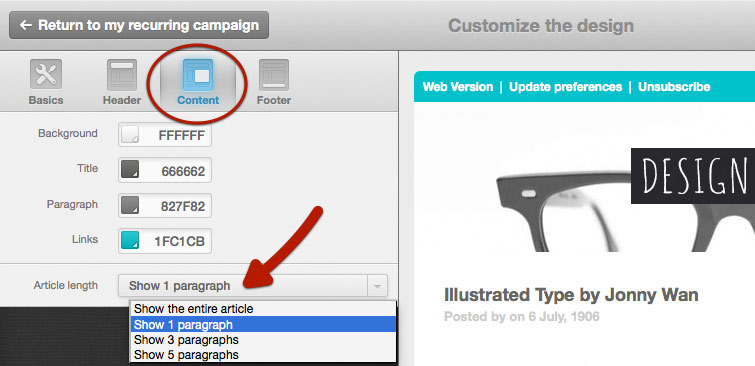
When you click Finish and define recipients you'll be prompted to name the template. This will add it to your saved templates.
Code your own RSS template
If you'd prefer your own custom-coded template, contact your account administrator about designing one for you, or providing access to our template language documentation. When it's ready you, or your admin, can import it for you to use.
Frequently asked questions
Below are some answers to questions we're commonly asked about custom-coded RSS templates. For help with something we haven't addressed, please contact us.
Why are my images are not showing, or not displaying correctly?
It may be that your RSS feed is not attaching images in a way that the application can recognize. The <rssimage /> tag requires RSS enclosures to pull images into the feed. There are two RSS attachment types that we support:
<enclosure type="image/*" />Or:
<media:content type="image/*" >Can I add alt attributes to RSS images?
Unfortunately, no, because neither the <enclosure /> nor the <media:content /> tags support alt attributes.
The only option would be to include the image in the <description /> tag with its alt attribute, however, doing so removes the control over the image's style and size — because it won't be picked up by the <rssimage /> tag with all its email-specific styling.