 HOME
HOMEHere’s a roundup of the latest feature releases and product improvements:
May 2026
Signup Forms
Signup forms now have a dedicated home in the main navigation. Everything you need to create, manage, and track forms across your campaigns, all in one place. You can now quickly locate the right forms with the ability to name them, keep active forms organized by unpublishing those no longer needed, and prevent outdated campaigns from collecting leads by deleting them entirely.
Performance insights are built in too, giving you the data you need to sharpen your targeting and build more personalized experiences for every subscriber. Less busywork, smarter growth.
Managing signup forms across multiple campaigns just got a lot easier — they now have a dedicated home in the main navigation, with everything you need to create, manage, and track, all in one place.
Landing Pages
Capturing leads shouldn’t mean settling for a plain, static signup page. Now you can build landing page experiences with multiple sections, giving you complete creative freedom to design something that truly reflects your brand. The kind of polished, high-converting pages your campaigns deserve.
Getting started takes just a few clicks. Choose a template, customize the layout, content, and styling to match your brand, then publish and share. You have a powerful toolkit to engage visitors and move faster from idea to launch.
November 2025
Signup form enhancements: Reporting, countdown timer and more
The busy season brings more traffic. Why not make the most of it with a high-converting signup forms powered by our latest upgrades:
Reporting and analytics Track total subscribers, visits, and conversion rate directly in the signup form builder, and optimize performance and maximize list growth
Video: Make signup forms stand out by adding a YouTube video to the design. Use it as a visual aid to introduce your brand, or highlight key promotions.
Countdown block: Drive urgency and action this Black Friday and Cyber Monday with the new countdown block
Templates: New signup page templates complement our end-of-year email designs (below), and make it easy to create a cohesive campaign at every subscriber touch-point
End of year templates
After design inspiration for your end of year campaigns? We’ve got you covered with five new, professionally designed, customizable templates including 2025 wrap up, Last chance delivery and Happy holidays designs.
September 2025
Signup form updates: Holiday templates and flexible design options
To maximize holiday traffic and subscriber conversion, we’ve added fresh holiday signup page templates* which compliment our new email templates (below), so you can seamlessly craft an engaging end-to-end holiday campaign.
We’ve also released the following capabilities that ensure flexibility and brand consistency:
- Advanced heading options enable you to toggle uppercase, create line breaks, adjust line height, letter spacing and add shadows
- Apply effects and filters to background images for accessibility
*Signup page templates only available on plans.
2025 Holiday email templatesTo help add some sparkle to your email program, we’ve released seven new holiday templates including Black Friday, Cyber Monday and Giving Tuesday designs.
Find them in the ‘latest category’ of template themes now.
August 2025
Signup form updates: QR code generator and more templates
Once you’ve finished creating an engaging form, you now have the option to download a QR code that directs to your signup form. Simply add the QR code to any event or printed marketing materials and you’ll never miss an opportunity to attract new subscribers and grow your list.
We’ve also added more customizable, professionally designed signup form templates to the template gallery, making it seamless to craft eye-catching signup pages.
July 2025
Email builder enhancementsCheck out the recent enhancements that we’ve made to the email builder:
- Bullet points automatically match the color of the email text
- ‘Pill’ style call-to-action buttons are now available
Ensuring flexibility and brand consistency across all elements of email design.
June 2025
Signup page template galleryThe Signup page template gallery has 12 customizable, professionally designed templates*, so you can seamlessly craft eye-catching signup pages that help grow your list (and your business). Find them in the signup form builder today.
*Only available on monthly or annual plans.
Managing automation list hygiene just got easier with our new ‘remove subscriber’ step. This capability automatically removes inactive or unwanted contacts – saving you time, helps improve your delivery rate and ensures your automated journeys focus on your most engaged audiences.
May 2025
Prebuilt event automated journeysCreate an engaging end-to-end event email strategy in a few clicks with these new prebuilt automated journeys:
- Event registration: Build interest and drive registrations with this best-in-class prebuilt journey layout
- Post-event follow up: Engaging attendees after your event is equally as important as the event itself. With this prebuilt journey you can showcase event highlights, thank attendees and capture interest for future events
Both are designed to save setup time so you send timely and relevant event automated messages – simply customize, refine and turn them on.
Changing up templates is a great way to keep an email marketing program fresh, helping drive interest and that all important subscriber engagement. We’ve released the following professionally-designed, customizable templates, ensuring your emails are effortlessly engaging:
- Event invite: Events are a great way to connect with your audience and subscribers. We’ve created a Memorial Day inspired event invite template, that will rejuvenate any event strategy
- Promotional offer: With the arrival of a new season, it’s the perfect time to send promotional offers using these stylish templates
- Announcement: This engaging design will be sure to capture your audience’s attention for your next important announcement
Check these and 100+ more templates (there’s one for every marketing objective) in the ‘latest category’ of template themes.
February 2025
Signup form feature enhancementsAn engaging, effective and on-brand signup form is essential to not only capturing new subscribers’ attention but also for growing a healthy list. Check out the new range of exciting and flexible features within the signup form builder that make it easier to customize designs:
- More versatile layouts: Choose from a selection of multiple section layouts and customizable padding options
- Enhanced section backgrounds: Add your brands personality with background images, maintain consistency with a wider selection of colors, or adjust transparency for added depth and dimension
- Boosted header image and heading control: Both can now be used together. The header image size is adjustable, and alignment can be controlled for images and headings
- Expanded button and all-new field styles: Get creative with various buttons styles and fields options
- Separate form and success page tabs: To streamline the user experience, content and style options are now under the one tab, so you can create, then instantly switch to the success page and craft a thank you message
January 2025
New text padding optionsNew text block padding is now available in the email builder, giving you more flexibility for layout and spacing when designing emails.
Conditional path selection change in automated journeysFor marketers the only constant is change – that’s why there’s new functionality enabling you to swap the conditional path selections for automated journeys, in a click of a button.
December 2024
Create segments from a campaign reportTurn insights into action by creating a segment directly from the campaign report page and streamline sending personalized, timely and targeted follow-up messages, based on how a subscriber has engaged your email.
November 2024
Signup form updatesThe signup form feature has a range of new, customizable design and accessibility elements, including:
- 40 new font types: A wider selection of modern fonts ensures you maintain brand consistency from a subscribers first interaction
- More preview options: Preview in both mobile and full screen modes, giving you so complete confidence that your forms render perfectly on all devices
- Direct access in ‘Lists and subscribers’: Making it more accessible to create or update existing signup forms via the navigation menu in ‘List and subscribers’
- Subscriber signup total: Displays the number of subscribers who have completed signup forms – so you can review and optimize
October 2024
Templates page refresh and new search barThe “My Templates” page user experience has been refreshed with a more modern and intuitive layout and now includes a search bar when you have 10 or more templates – making it quicker to search for your most-used templates.
Introducing the ‘Wait Until’ scheduling functionality that enables you to customize automated email send times to best your subscribers, so you can:
- Avoid sending during quiet hours (i.e. weekends or out of office hours)
- Boost engagement and open rates of automated journeys
- Improve subscriber overall experience
May 2024
Automatic account invitation reminderTo improve the onboarding experience for new users we’ve recently introduced an account invitation reminder email. This will automatically send when new account users don’t accept their initial invitation after a few days, prompting them to set up their password.
April 2024
Non-human click filter*Noticed an increase in your click metrics? Your campaigns may be affected by third party software. If you’re interested in banishing bot clicks, the non-human click filter is the solution for you. This industry-leading feature detects and removes third party software clicks, ensuring you’re accurately measuring and reporting genuine user engagement.
*Available as a monthly add-on for Essentials and Premier plans only. To access, please contact your account administrator.
Engagement Segments**Using segmentation to send personalized messages is key to driving higher engagement with your audience. The engagement segments feature automatically categorizes your subscribers’ into six pre-built segments based on their level of interaction with your emails:
- Active — Last opened or clicked in past 30 days
- Engaged — Last opened or clicked between 30 and 90 days ago
- Unengaged —Last opened or clicked between 90 and 180 days ago
- Dormant — Last opened or clicked between 180 days and 12 months ago
- Zombies — Last opened or clicked more than 12 months ago
- Ghosts — Subscriber has never opened or clicked any email, 12 months or more since the first email was sent
Making it easier to monitor engagement, and send timely, personalized content, such as a re-engagement campaign to inactives or reward your most engaged subscribers with exclusive content and offers.
**Available as a monthly add-on for Essentials plans (included in Premier plan). To access, please contact your account administrator.
November 2023
Automation: Prebuilt JourneysAutomated journeys are an email marketers best friend – not only do they deliver increased ROI and engagement, but they also save a ton of time. To make it easier for you to harness the power of automation, we’ve released a new range of Prebuilt Journeys. In a few clicks you can now automatically trigger:
- Welcome journey
- Anniversary offer
- Thank you email
- Win-Back offer
The prep is already done, all you need to do is review and customize – then turn them on.
October 2023
Subscriber re-entry capabilities for segment-triggered journeysYou can now choose for subscribers to re-enter your segment-triggered journeys, which enables you to send (or re-send) targeted emails based on personalized experiences or behaviors – such as VIP offers for loyal subscribers.
AI Writer*Say goodbye to writer’s block with the AI Writer*, a powerful, easy-to-use Generative AI feature, designed to help make content creation more efficient. The AI Writer* saves you time, increases ROI and helps you deliver the right message to your audience by:
- Crafting compelling email content based on your prompts
- Proofing grammar and spelling
Plus, you can easily update the tone of voice or format to suit your brand. All you need to do is review, refine.
*Only available on monthly plans.
September 2023
Bulk upload suppression listsIt’s essential for marketers to effectively manage their lists - especially when it comes to opt-outs. In just a few clicks, you can now upload and suppress up to 50,000 email addresses at one time.
Auto-format lists and bullet pointsThe email builder automatically formats lists and bullet points, when you to use keyboard shortcuts (e.g. "1", "-" or "*") to craft your message.
Comparing the performance of previous campaigns is essential when measuring and maximizing email marketing success. The compare campaigns experience has been updated with an easy-to-scan bar graph, so you can assess, take action and adjust your strategy.
Emoji picker available in the email builderSpice campaigns and elevate engagement by adding emojis into your email content
Review and reuse top performing subject linesYou can now review and compare the performance metrics of your last 10 subject lines to see which one resonated with your audience the most. If there’s a clear winner that you want to use again, simply select ‘reuse’ and it will automatically populate your previous winning subject line.
August 2023
Automations - email builder refreshWe’ve updated the automated journey email and template builder to include an intuitive drag and drop functionality, to match the campaign builder experience that you already know and love. Making it a more seamless and efficient email design process when building your automated journeys.
Automations - Step name now optionalTo reduce mandatory requirements (and setup time) when building your automated journey, adding a ‘step name’ for individual emails is now optional.
Custom fields filtered by listLeveraging relevant custom fields for your audience is now more accessible. First, attach the list for your campaign send, then when you select ‘insert’ followed by ‘custom field’ in the email builder, only custom fields available on that specific list will be available.
Custom segments now more accessibleIf you’ve set up pre-built segments, they're now located at the bottom of the ‘segments’ page in your list. This ensures your custom segments are more accessible and saves you time (no more scrolling).
July 2023
Confirmed unsubscribe experience now available in multiple languagesConsistency is key to audiences feeling connected to brands and businesses. So, if you’re sending content in languages other than English, the confirmed unsubscribe experience will now automatically translate to the same language featured in your email, ensuring consistency across all your subscriber touch points. To leverage this feature, simply follow these steps:
- Activate the confirmed unsubscribe feature (if you haven’t already)
- When creating your next campaign in the email builder, navigate to ‘Settings’ (click the cog icon in the build menu located on left hand side)
- Then select the preferred language for your subscriber
That’s it, now the confirmed unsubscribe experience will automatically translate to your chosen language. To access, please contact your account administrator.
Trigger a welcome journey from an importTo welcome new subscribers to your business and create a good first impression, timing is everything. Now, you can automatically trigger your ‘on subscription’ journeys when you import or add new subscribers to your list (no API needed).
June 2023
New Shopify IntegrationWe’ve developed a new Shopify integration with the following enhanced capabilities:
- Abandoned Cart Journey: Create an abandoned cart automation using our prebuilt journey to help recover lost revenue. It also includes analytics that make it easy to track and attribute these sales to specific activity
- Order Receipt Confirmation Journey: Give customers a transparent and hassle-free post purchase experience
- List sync capabilities based on subscriber permissions: Gives you more control and flexibility over your lists, as you now can choose to sync all of your contacts or to only sync subscribers who have opted-in to receive your emails. (Please note: if you choose to sync opted-in subscribers, you will not be able to use automations such as Abandoned Cart or Order Receipt journeys)
To access the new Shopify integration please contact your account administrator.
SMS Updates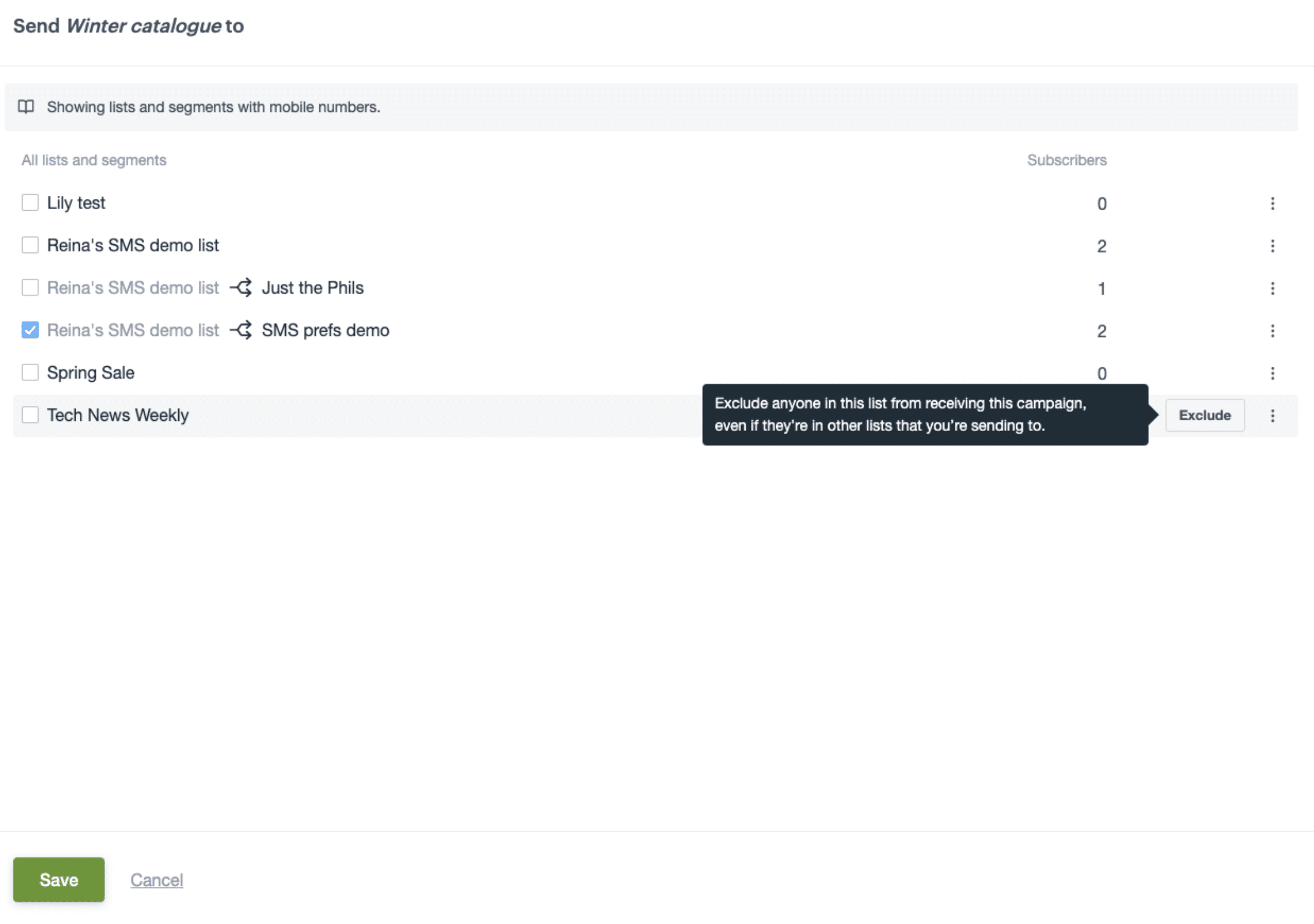
We’re always adding new features to our SMS solution to make it easier to create, track and manage your SMS campaigns:
- Allow for cross functional growth by utilizing your existing data and segmentation strategy for email for your SMS campaigns with SMS Recipient Exclusions. Making sure that you target who you need to target!
- Allow your customers to add their mobile details in your preference center so that you can easily capture SMS opt-ins from your existing subscribers.
- Grow your list by capturing SMS opt-ins via sign up forms. We’ll automatically include a consent checkbox to ensure that you only capture mobile numbers from customers who want to receive SMS marketing, to help you avoid any compliance issues.
March 2023
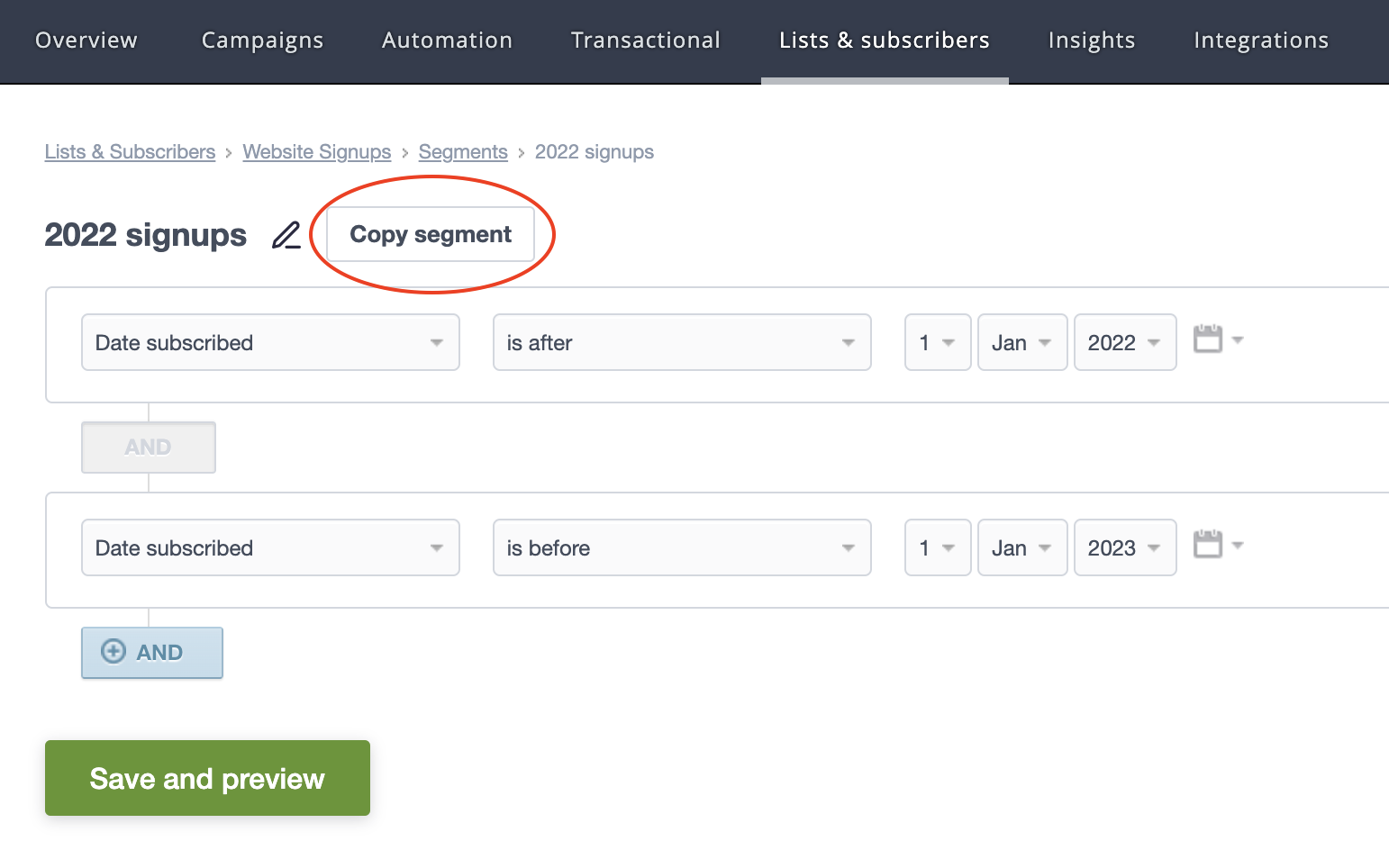
Copy a segmentSave time with our copy a segment feature. In one simple click, you can copy an existing segment and from there, make changes to your audience as needed. This not only saves you time but, more importantly, reduces errors in those times when you have similar, but slightly different audiences.
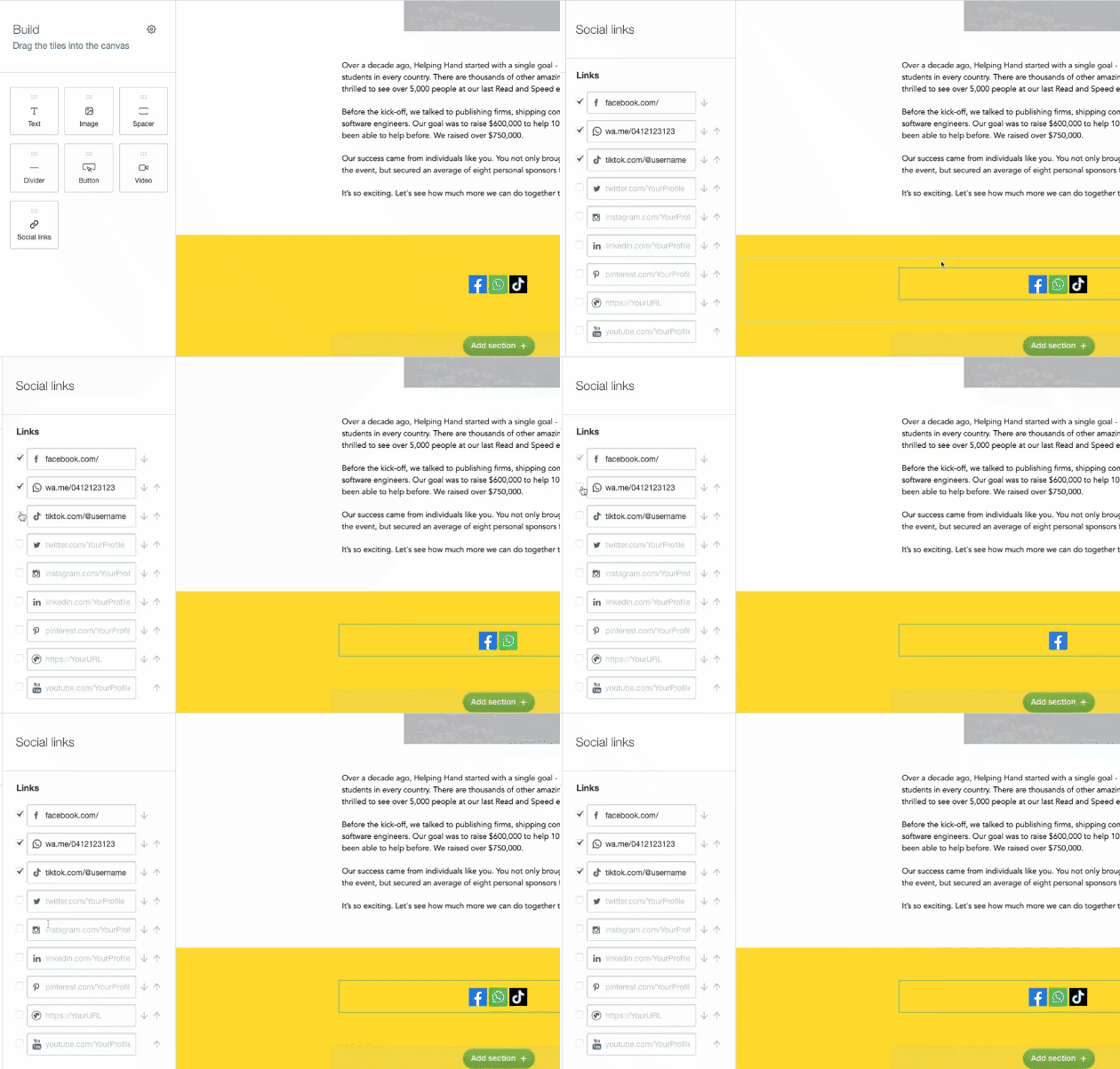
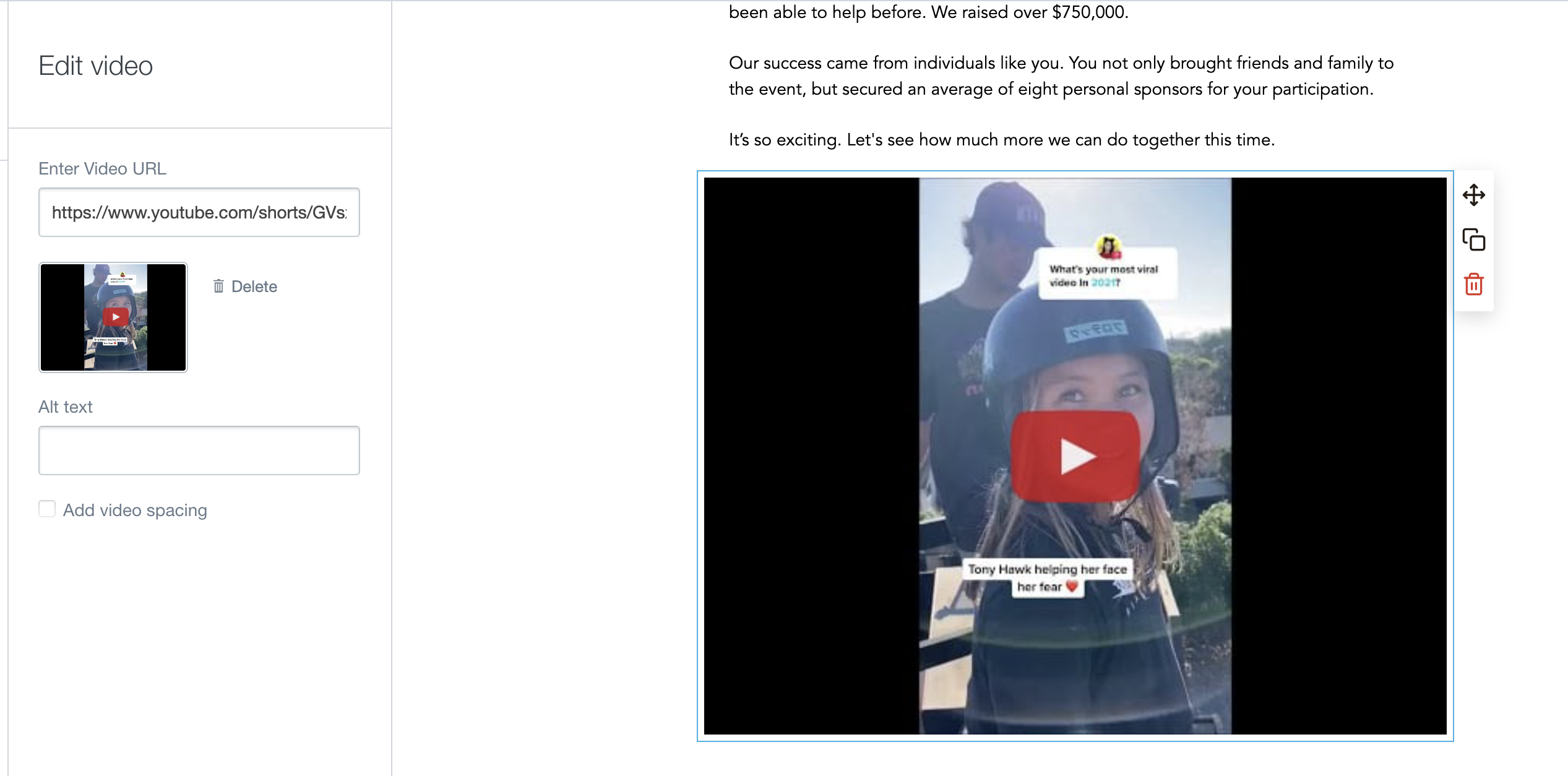
Enhance your social media and content strategy with these additions to the email builder:
- Add links to your WhatsApp and TikTok in your emails to further integrate your marketing across social channels.
- Utilize short form video content by adding in YouTube short links into your emails.
December 2022
Holiday templates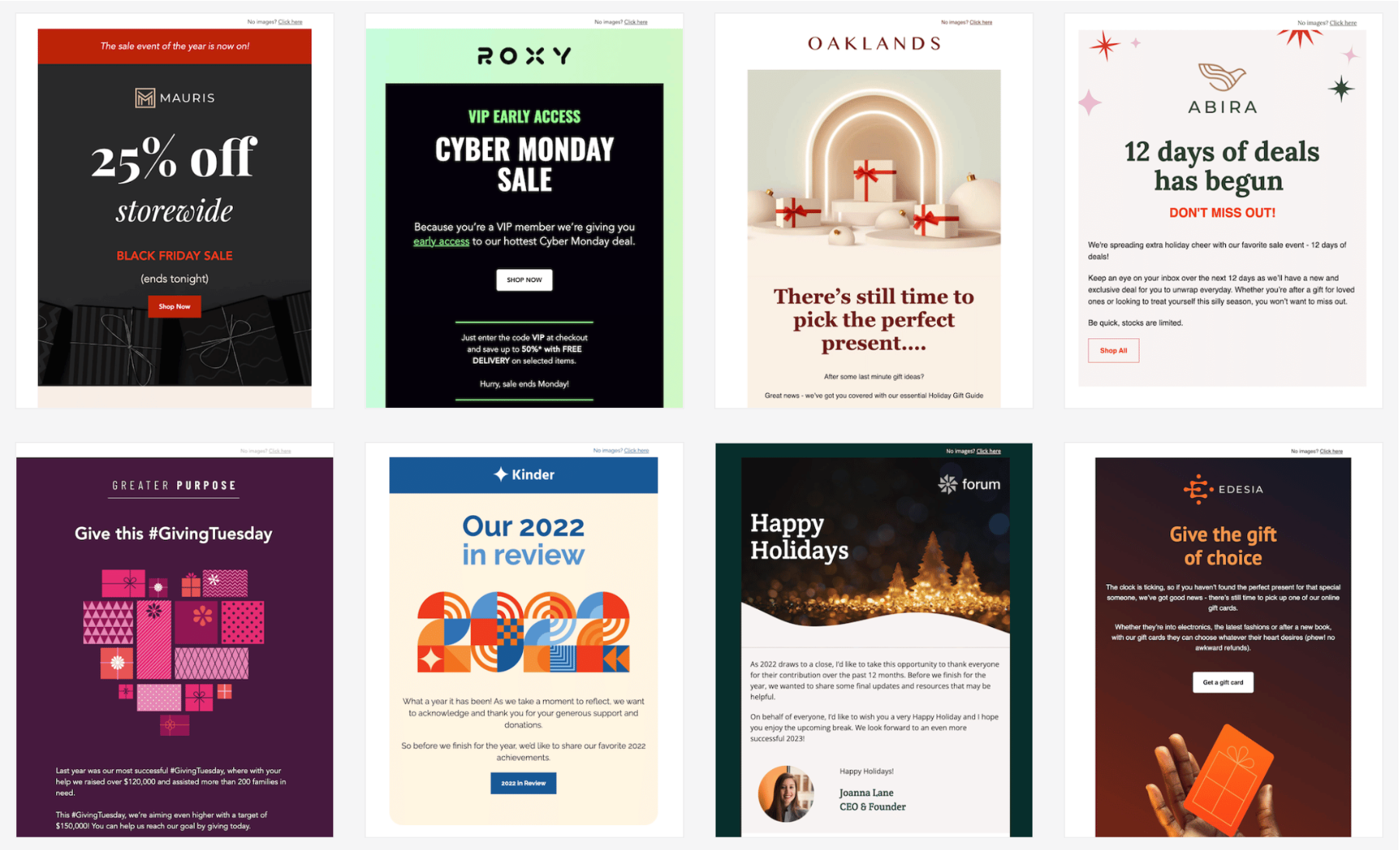
Sleigh the inbox this holiday season with new templates, designed by our team of email experts.
From Year in Review to Christmas offers, there’s a template for every festive occasion.
Check them out in the Latest category of your template library.
November 2022
Email builder improvements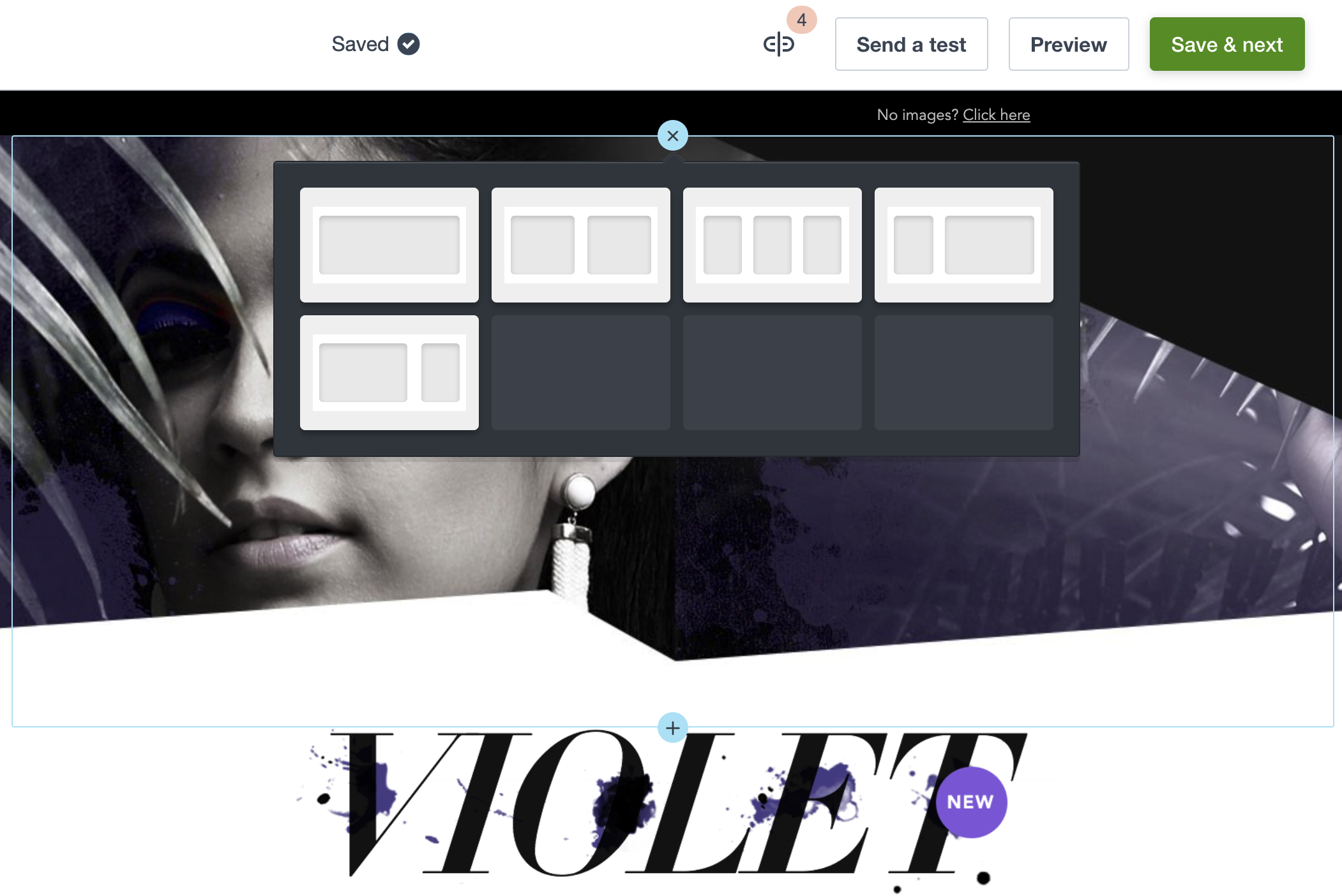
Reduce your email design time with these exciting new upgrades in the email builder:
- Add new sections to your design from anywhere in your email (rather than having to add them at the bottom of your email and move them around)
- A new navigation bar at the top of the builder, so you can review your links and send a test in fewer clicks
- New font sizes above 64px, to draw attention to important headlines
- Easier drag and drop functionality for your content blocks, to help new users upskill in no time
September 2022
Recent images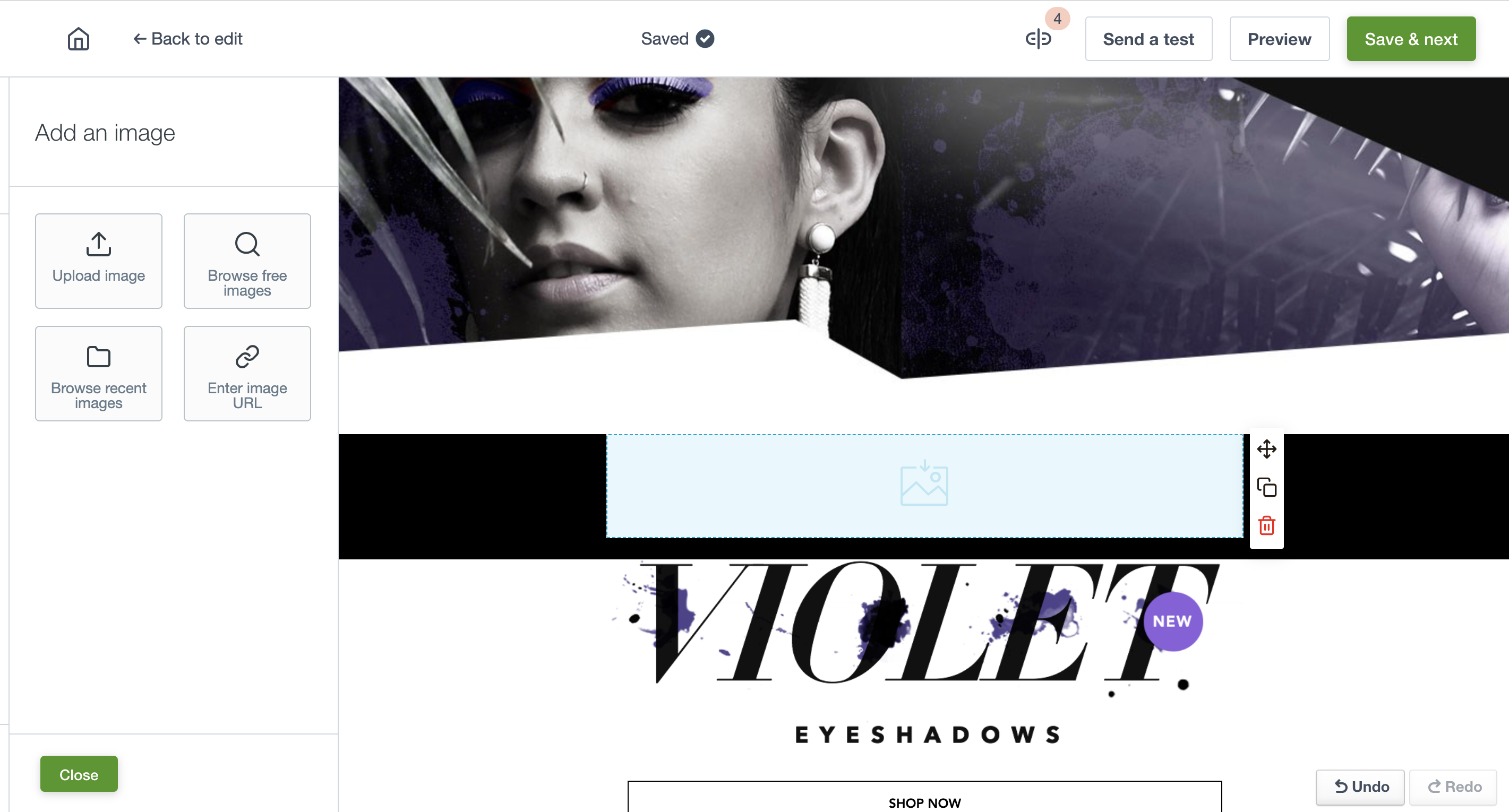
We now store your recently used images for you to view and re-use when needed. Uploaded images will be stored directly in the email builder so that it is even easier to drag and drop impactful images into your campaigns.
August 2022
Assistant improvements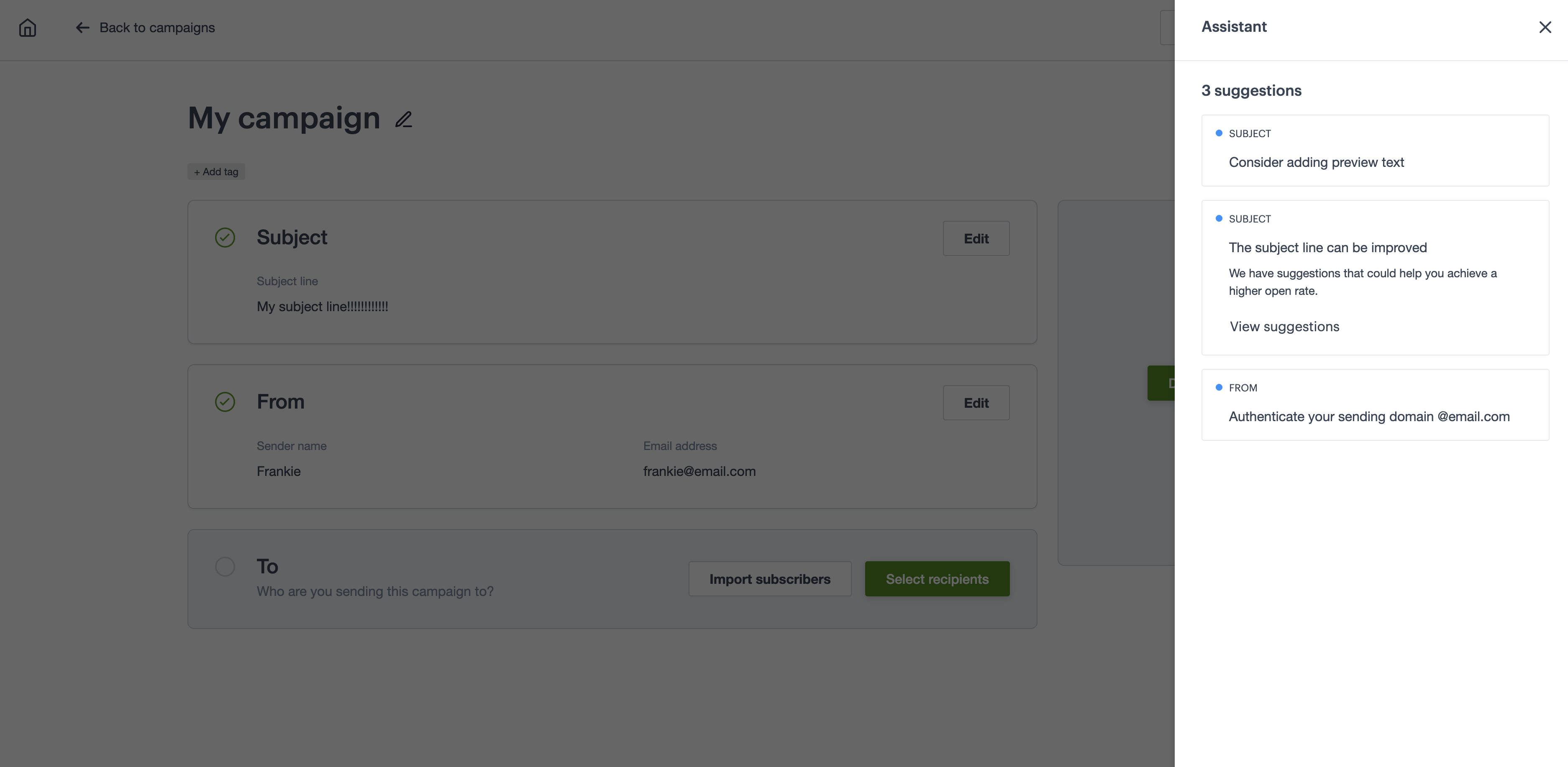
The Assistant gives you useful tips and reminders to help you follow best practice and feel confident pressing send on your campaign.
We’ve added three new reminders to increase campaign engagement and deliverability:
- Preview text is missing
- Subject line could be improved
- Sending domain needs authentication
Now it’s easier to get your campaign in the right hands while increasing engagement and enticing your audience.
June 2022
Emoji picker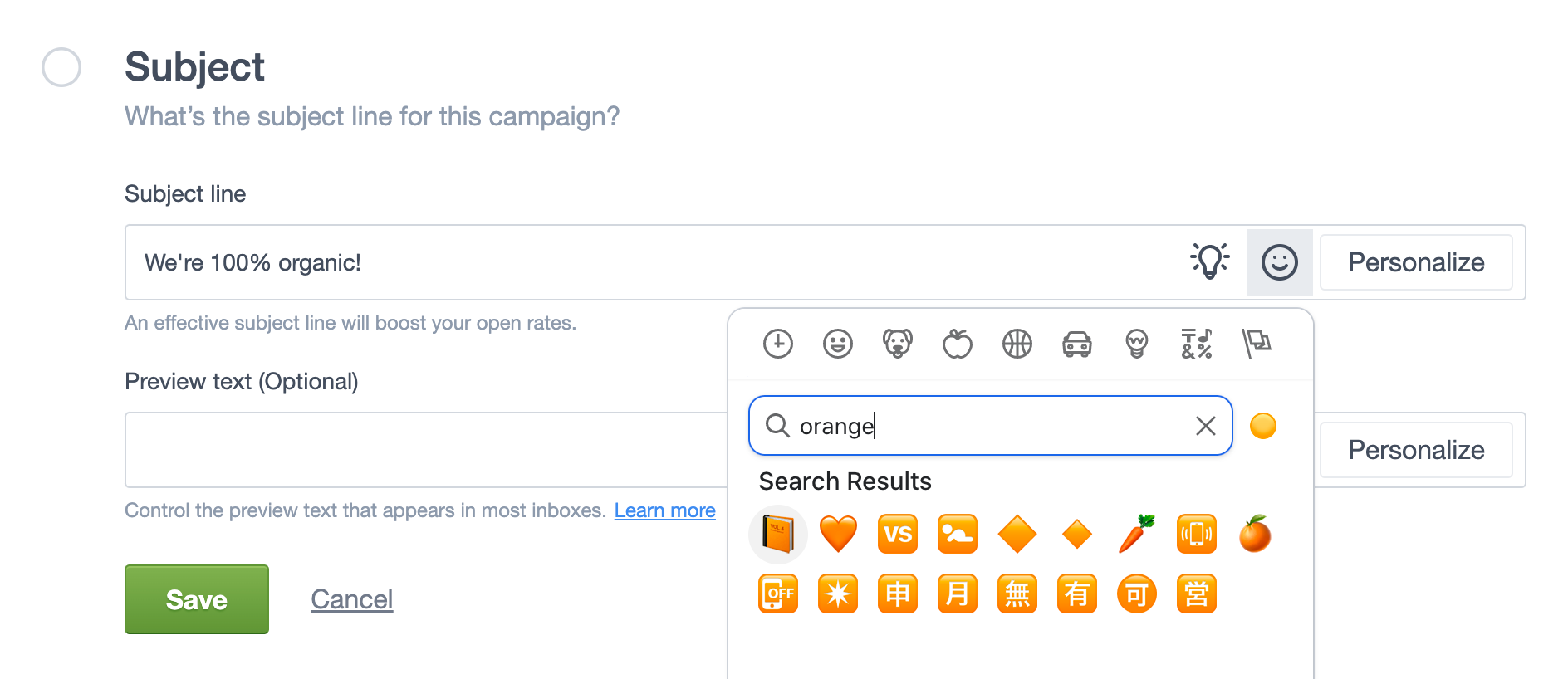
Easily spice up your campaigns with emojis to subject lines to improve visibility and increase brand awareness. The emoji picker makes personalizing messaging simple.
May 2022
Subject line recommendations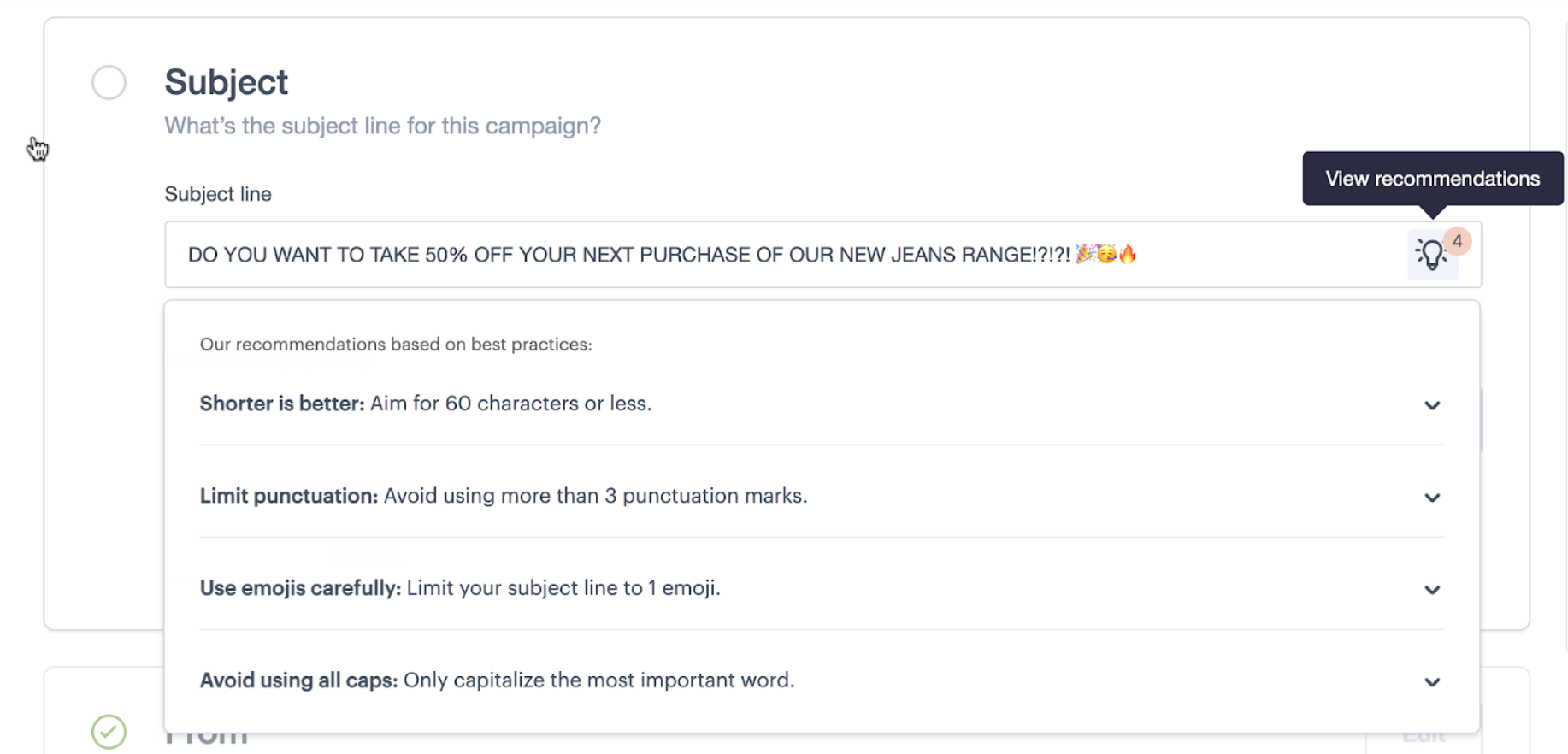
One of the most valuable parts of your email campaign is your subject line. A great subject line will entice your audience to open your email, giving you a better chance of increasing engagement and ROI from your campaign.
When creating your subject line, a blue light bulb icon will appear with our new subject line recommendations, which will help you craft the perfect subject to maximize open rates:
- Limit subject line length to 60 characters: Long subject lines may get cut off when viewed on some mobile devices and email clients. We recommend using a maximum of 9 words and 60 characters.
- Avoid all caps: Your email performance may be negatively impacted if your subject line reads as though you’re yelling. Using caps can be effective if you capitalize just a single word to highlight its importance.
- Use emojis carefully: Emojis are fun and can add personality. However, according to our research, you should use no more than 1 emoji at a time to avoid looking like spam. Use an emoji to supplement words rather than replace them.
- Limit punctuation: Research shows that it’s best to use a maximum of 3 punctuation marks (in this case exclamation or question marks) per subject line. Too many can make your email look like spam.
With these recommendations, you can feel confident that your subject line is the right length, contains the right punctuation, and has just the right amount of emojis!
Contact your admin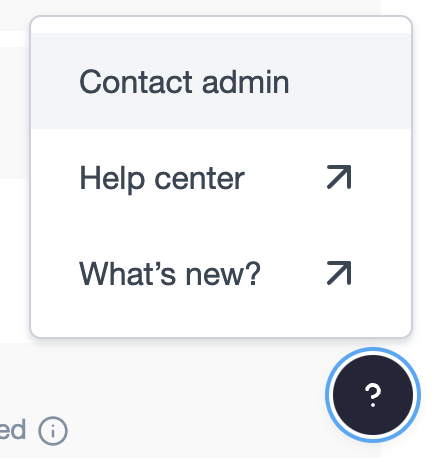
You can now select Contact admin in the help menu in your account to contact your account administrator. This will make it simpler for you to get in touch with the right person when you need help.
Keyboard shortcutsSave time editing your email copy with keyboard shortcuts. All keyboard shortcuts are now supported in the email builder so that you can underline, bold, align, insert links and more, directly from your keyboard.
March 2022
Email client usage report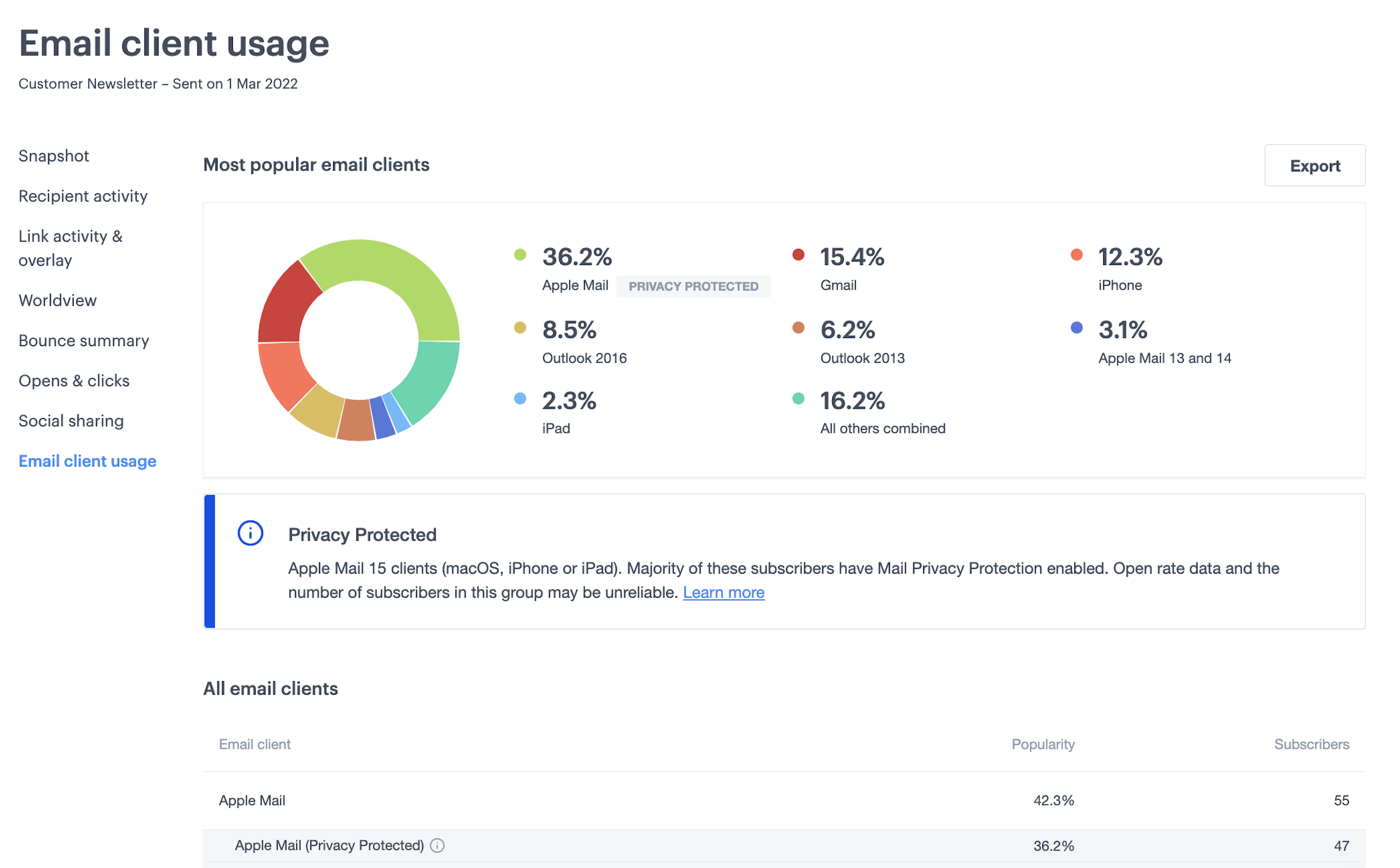
The email client usage report gives you a breakdown of the different clients and devices that recipients are using to view your emails.
We’ve added a new category, Apple Mail (Privacy Protected), which identifies the subscribers that are most likely to have been impacted by Apple Mail Privacy Protection (i.e. people using iOS15, iPadOS 15 and Mac OS Monterey). This new category is available for emails sent after February 2022.
This will help you understand the extent to which MPP may have impacted your open rates for a particular campaign or journey email, and understand whether your open rates have likely been artificially inflated as a result of MPP.
February 2022
Campaign experience improvements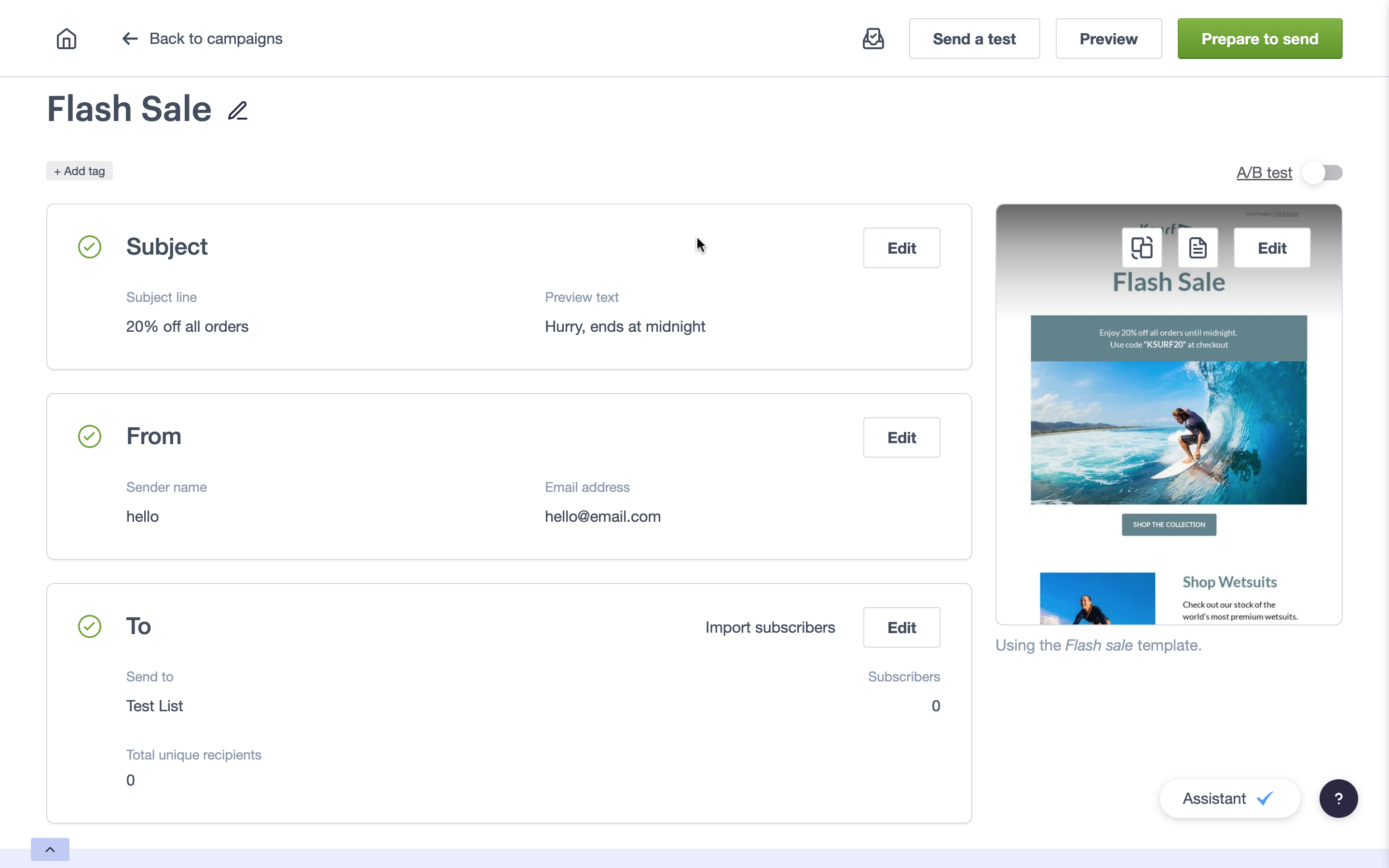
Editing your campaigns just got even quicker!
We've listened to your feedback and have introduced some improvements to the campaign experience to help you manage your email designs, and preview and test your campaigns:
- All your preview and test features are only one-click away at the top of the page
- Your template name will appear below your email design preview, so you can ensure you're using the correct template every time
- New quick design options will appear over your email design preview to help you swap out your template, edit your design, and manage the plain text version of your email
With these new quick actions, you can create your campaigns in less time and move onto other items on your to-do list.
New journey metrics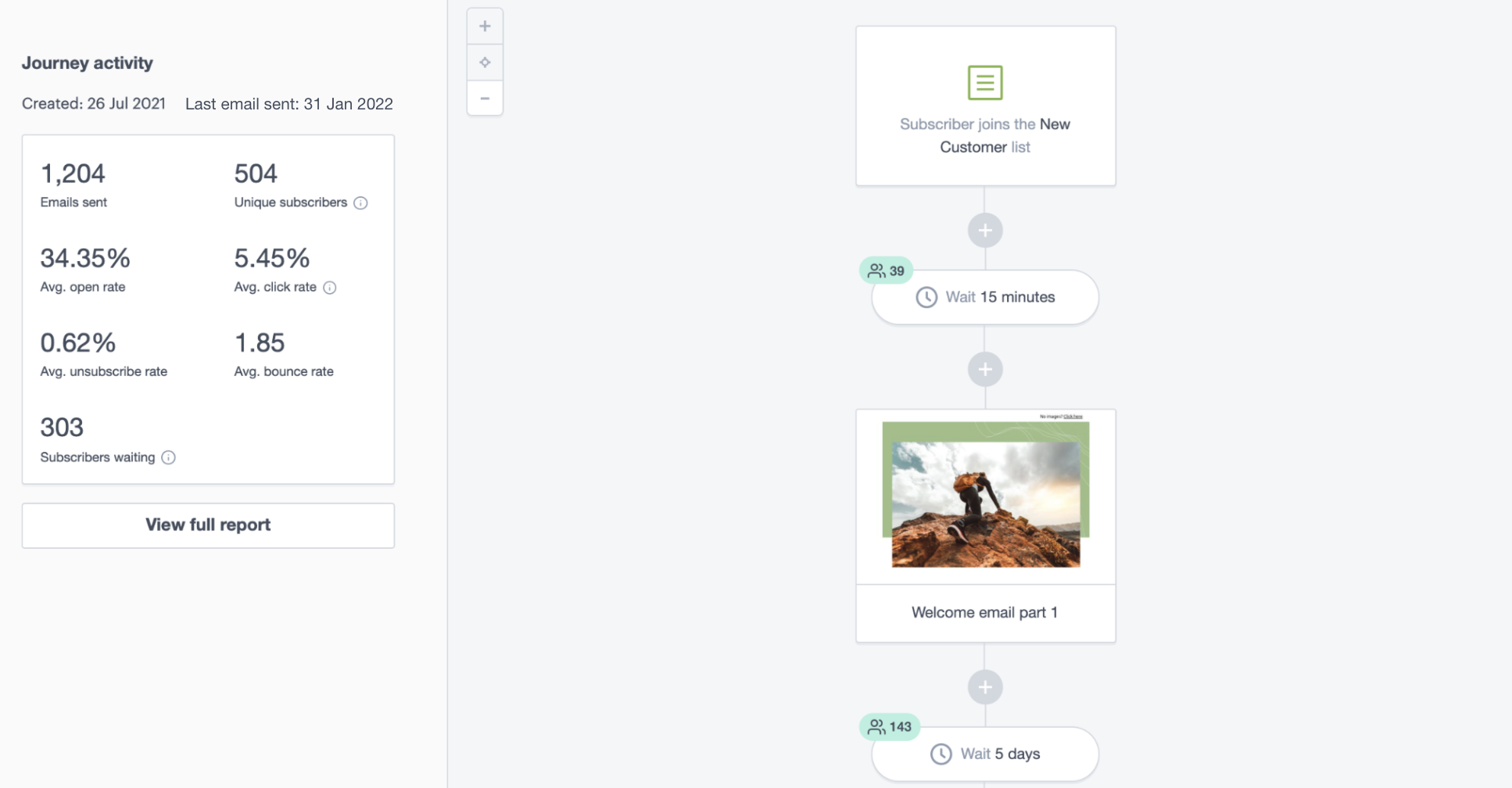
We've introduced new metrics in the journey builder to help you track the performance of your automations over time:
- Subscribers waiting: Shows how many subscribers are waiting at 'delay' steps in your journey, to help you track your subscribers as they progress through a journey. The total number of subscribers waiting across all delay steps will be shown in the left panel of the journey builder, and a breakdown of subscribers waiting at each individual step will be shown in the journey builder
- Unique subscribers: Outlines the number of subscribers who have been sent at least 1 email in a journey, to help you monitor the volume of subscribers in a journey
- 'Created' date: The date your journey was first drafted
- 'Last email sent' date: The last time an email was triggered from your journey
These metrics will give you confidence that your emails are sending to the right audience, at the right time.
January 2022
New text styling options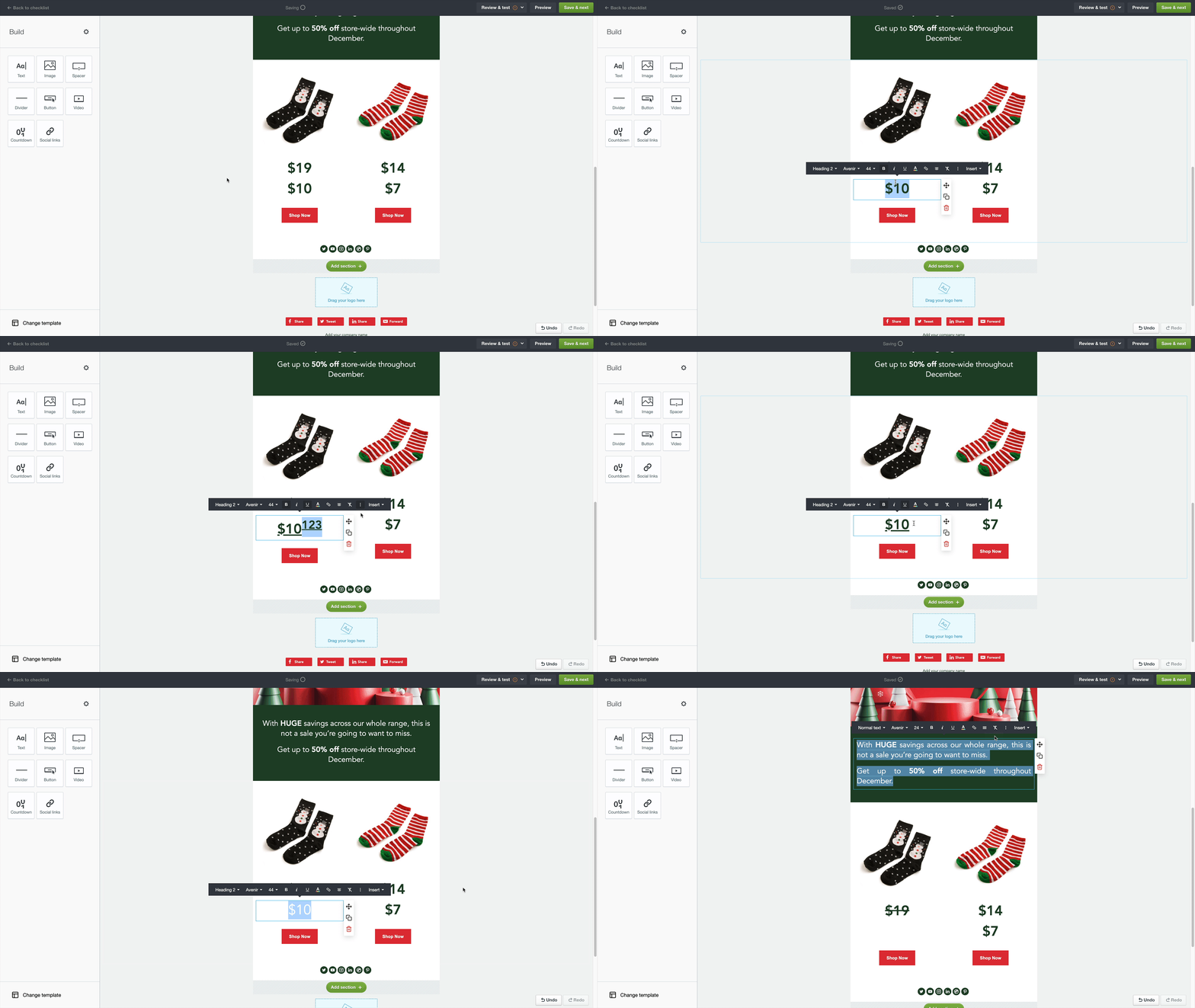
We've introduced new text styling options in the email builder, to give you more flexibility over your designs. The new options are:
- Justify
- Underline
- Clear formatting
- Strikethrough
- Superscript
- Subscript
Drag and drop a text block into your email design to try it out!
December 2021
Journey reporting refresh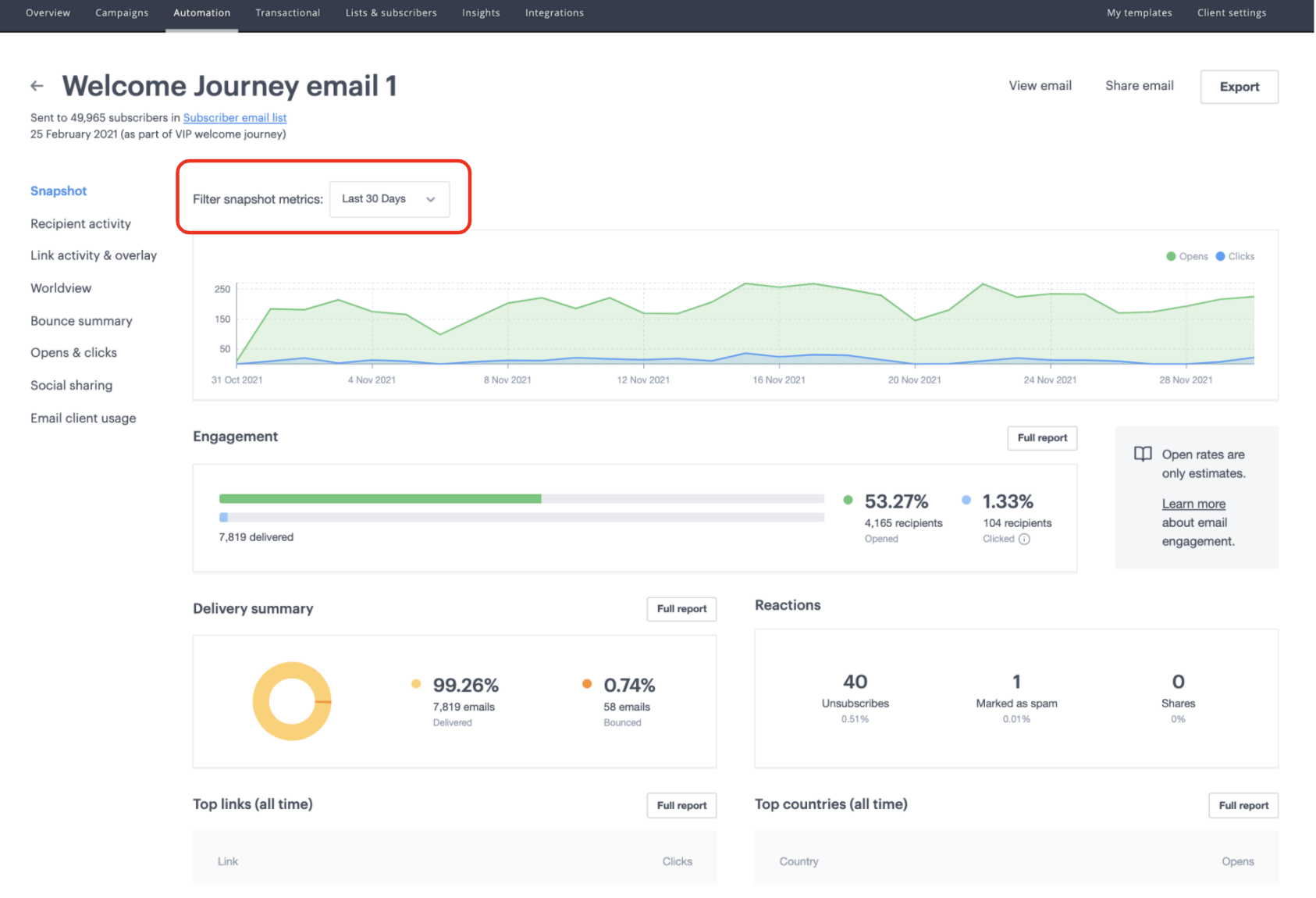
We’ve introduced a modern and intuitive layout for your journey email reports, to help you more effectively track the performance of individual emails in a journey.
We’ve also introduced a new date filter option so that you can monitor results over time.
October 2021
Reporting refresh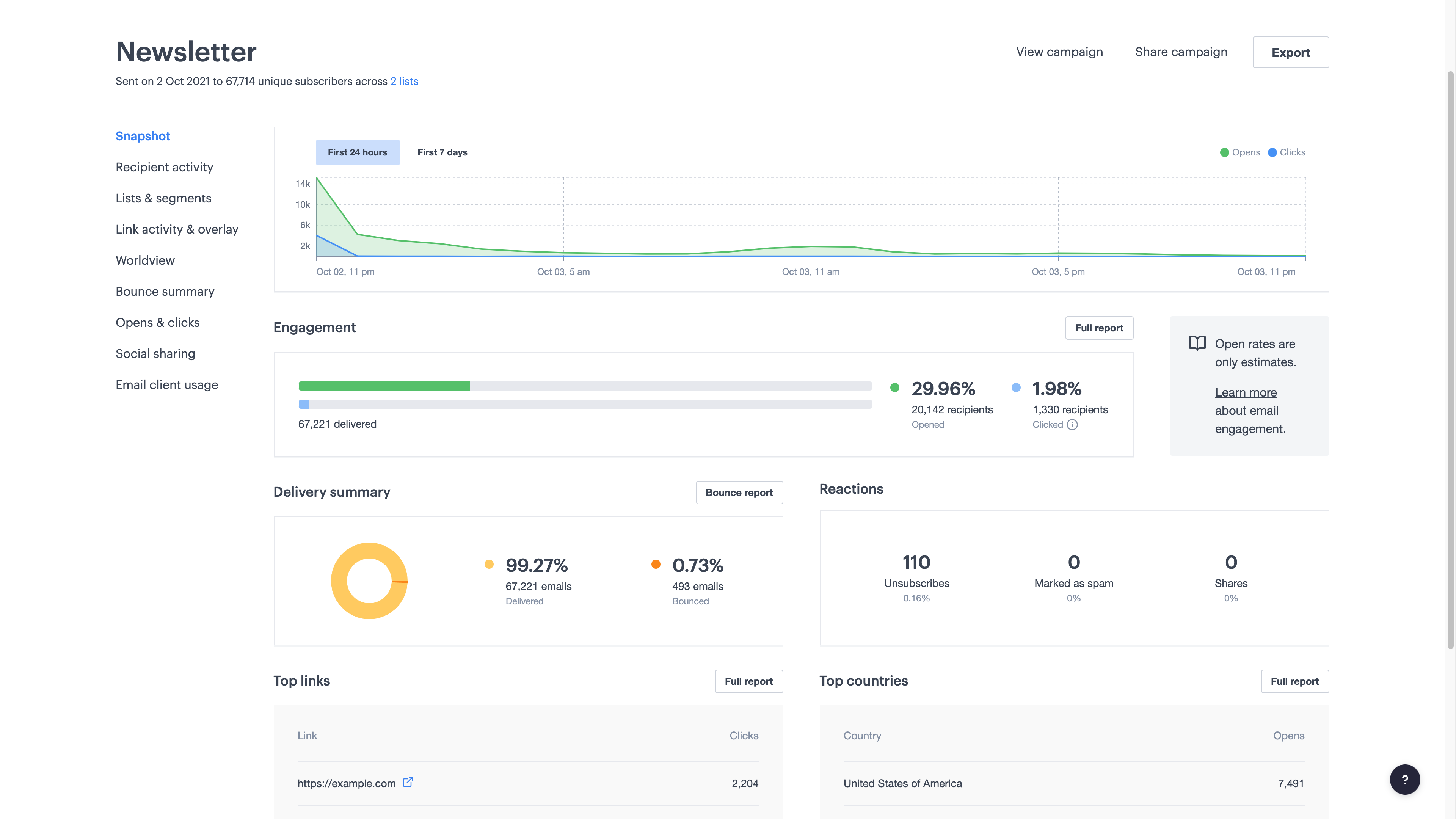
With our new and improved campaign reports, it’s now simpler to view campaign results, understand key email metrics and translate them into actionable insights for future campaigns.
You may notice some changes to your email metrics as a result of Apple Mail Privacy Protection, so we’ve increased the visibility of metrics that aren’t impacted, such as click rate and delivery rate.
September 2021
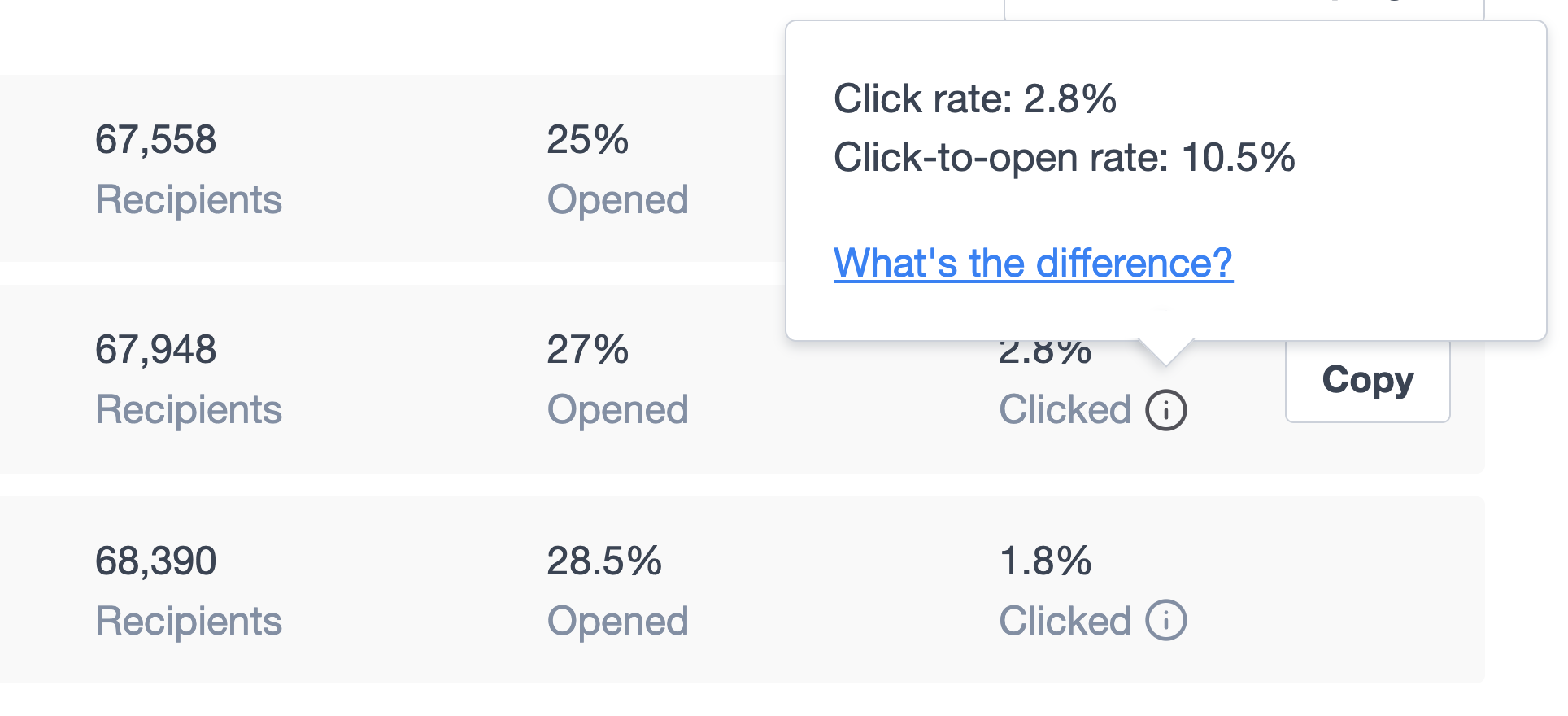
Apple Mail Privacy ProtectionApple recently launched Mail Privacy Protection, which impacts how open rates are measured for Apple device users. This means open rates and click-to-open rates (CTOR) may become less reliable.
To give you the most reliable measure of email engagement, we’ve replaced CTOR with click rate on the Campaign and Overview pages in the Clicked column. You can still pop open a view of your CTOR from the Clicked column.
August 2021
New campaign experienceThe new campaign experience is a smarter, more streamlined way to create and send campaigns.
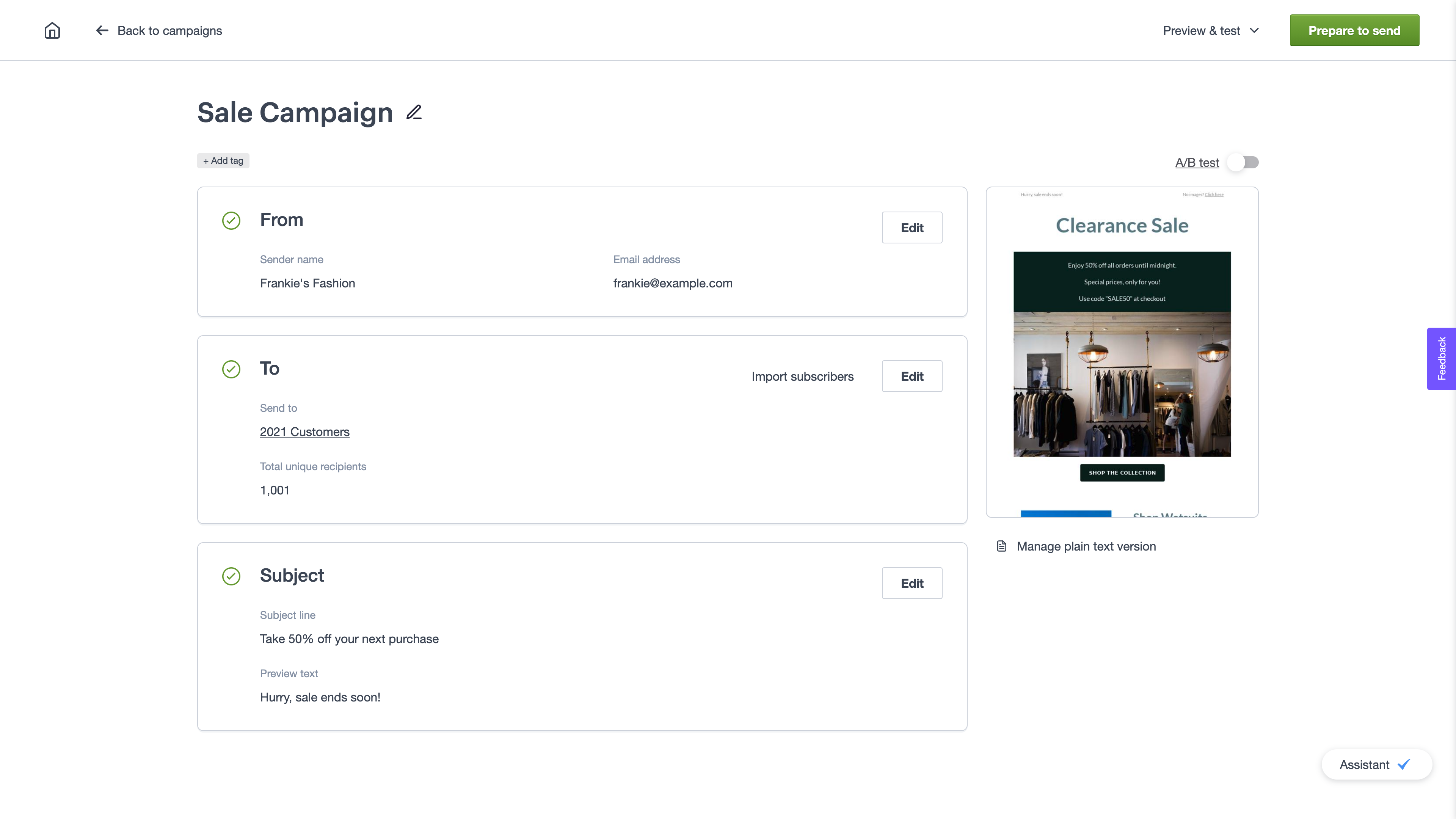
Create your campaigns from a single checklist page
- Edit all your campaign information from the one page, in the order that’s most convenient for you. That means less time wasted clicking back and forth between pages, and less page load time
- Quick design options to make it simpler to reuse a previous design, find the perfect template, or upload your own HTML
- A single place for all your preview and test options to give you peace of mind when you hit send
Smart recommendations to take your email program to the next level
We’ll help you maximize engagement by:
- Recommending the perfect A/B test to run based on your campaign objectives
- Helping you optimise your subject lines by providing a summary of your previous subject lines and open rates
- Suggesting lists to use based on previous campaign activity
It’s now available to opt in – just click Check out the new campaign experience when you create a campaign.
July 2021
Custom fieldsWe’ve upgraded the custom fields page to make it simpler to add and edit custom fields. Plus it’s now easy to access all your list information and settings from the left menu.
Welcome journey recipeA welcome journey is the perfect way to onboard new customers and engage subscribers – your subscribers not only expect them, but find them highly engaging. But we know setting them up can be overwhelming when you’re strapped for time.
We’ve introduced a welcome journey recipe which will guide you through the journey process to help you quickly send welcome emails to your subscribers and maximise subscriber engagement without the manual effort.
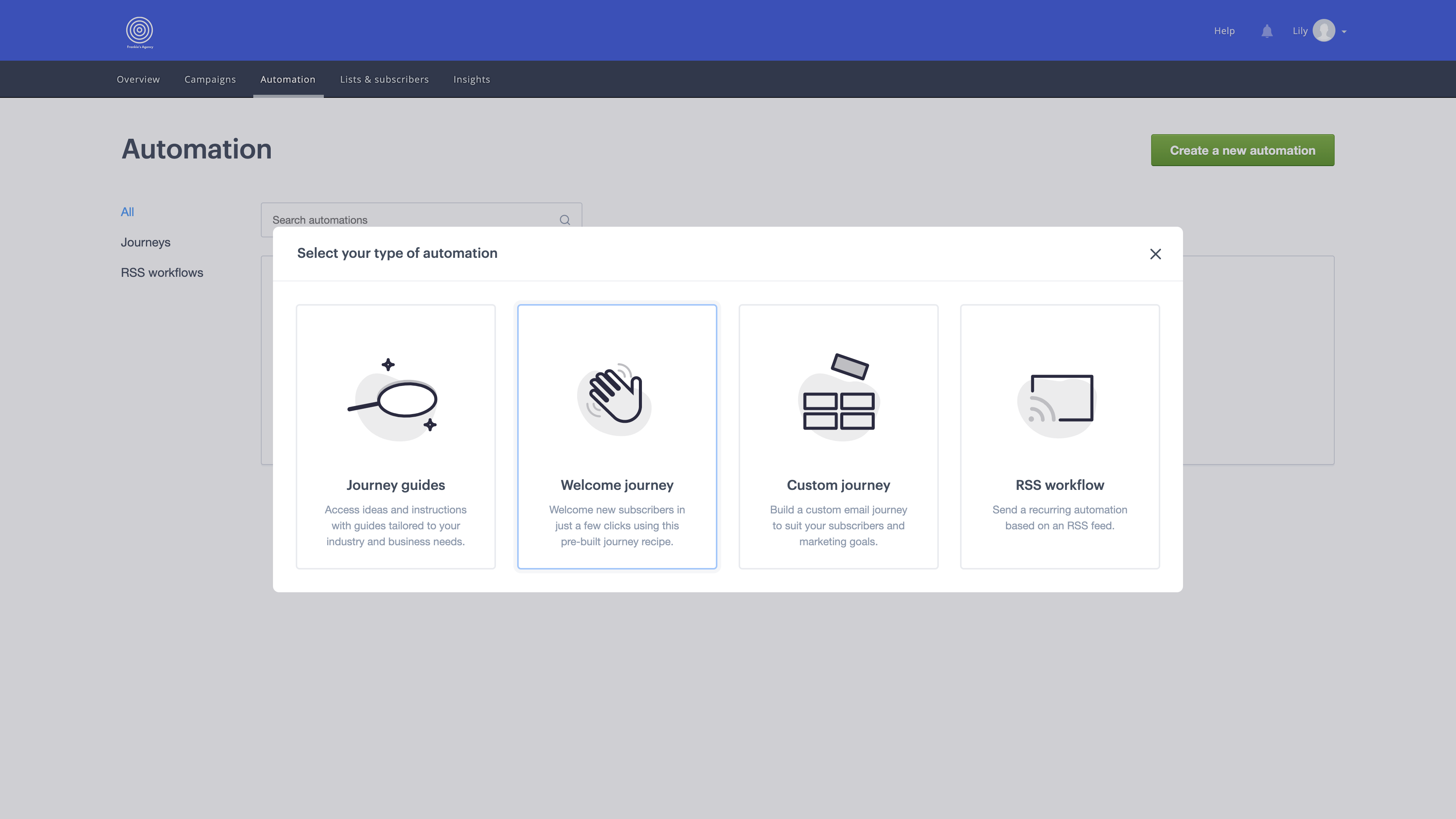
We’ve done all the prep for you – all you’ll need to do is review the journey and turn it on!
June 2021
New automation pageCheck out the improved automation page! We’ve kept all the features you know and love, but have made it simpler to view and edit your automated journeys and RSS workflows.
May 2021
New overview pageWe’ve improved the overview page to make it easier to view, create and manage campaigns, lists and automations. The new page gives you a bird’s-eye view of all your email activity, which is especially helpful when you have multiple team members working on different campaigns.
The new improvements include:
- Modern layout — There’s now less scrolling required to see all your important info. Plus new thumbnails so you can easily identify and differentiate your campaigns
- Shortcuts — Hover over a sent or draft campaign to quickly preview or copy. Hover over a scheduled campaign to cancel send. Now you don’t need to spend time flicking between pages to make these edits
- New create button — Create a new campaign, list or automation straight from this page to save you time
- Recent lists — We’ve added a summary of recent lists on this page to make it easy to jump straight into editing your subscribers
Select multiple lists at once and delete them in bulk, rather than having to remove them one-by-one. Just hover over a list and tick the checkbox for the lists you want to delete.
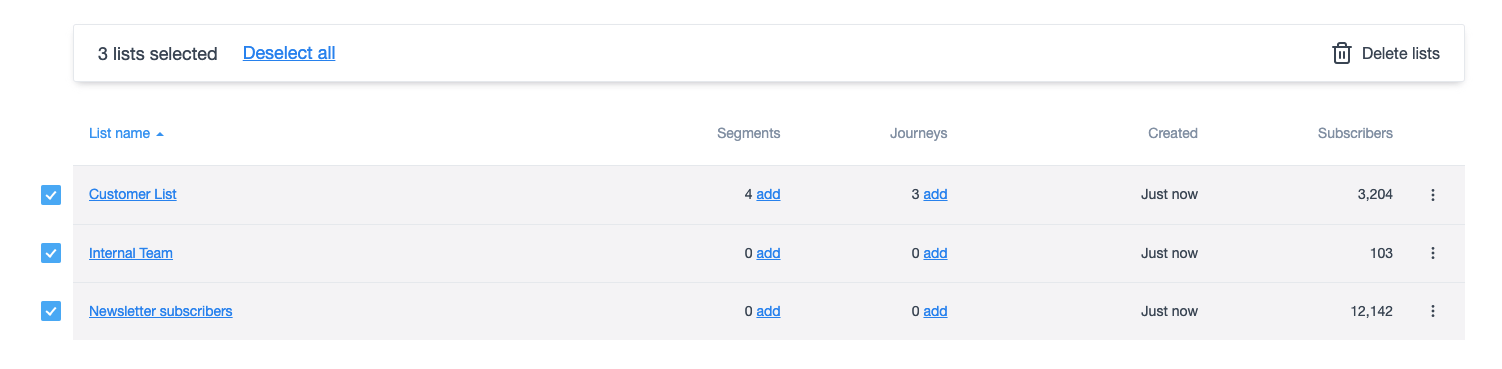
This is a big timer saver that will help minimise list quantity. We recommend maintaining a small number of lists with useful segments rather than a large number of lists, as this is the best way to track subscriber engagement over time and compare results between different subscriber groups.
April 2021
Footer flexibilityYou can now customize the footers in your email designs to be more functional and align with your brand.
We’ve introduced a broad range of flexible elements for your footers, so that you can:
- Edit layout (right, center or left aligned)
- Add a logo (in text or image format)
- Hyperlink text
- Add additional lines of text
- Customize the font, size and color of text
- Customize footer background color
- Add a border and customize the border color
- Customize the color of social share buttons
- Add top and bottom spacing
March 2021
Free image galleryWe know finding high-quality, low-cost stock imagery is difficult and time-consuming.
So we’ve given you quick access to free Unsplash images in the email builder, to help you send engaging emails that drive clicks and bring your brand to life.
No need to spend time trawling through stock image sites or uploading images manually – just search by topic for an image that suits your design, and drop it straight into your email. There’s over 2 million beautiful images to choose from.
February 2021
Lists & subscribersWe’ve made it easier to navigate, filter, upload, and search for your lists, subscribers, and suppression contacts.
Here are some of the key changes:
- Modern layout — Navigate between lists, subscribers, and suppressions from the one page
- Faster, streamlined flow for creating a new list — We’ve shortened and simplified the process for creating a new list and importing subscribers
- Improved list details page — A single page that has all the important information about your lists, including subscribe and unsubscribe settings and a drop-down menu for helpful list features such as adding an unsubscribe survey
- Subscriber details page — An updated page that makes it easier to view or edit specific subscriber information. You can search through an individual subscriber’s recent activity to see which emails they’ve received and opened, and which links they’ve clicked.
Make your email and social marketing work better together. Drag and drop links to your social media channels anywhere in your email design, as many times as you want.
Simply select the social links you want, and then customize the size, shape, alignment, layout and color to suit your design. You can pick any color you’d like, so that it aligns with your brand.