 HOME
HOMEIn our email builder, you can add mailto (email), tel: (telephone), and sms: (SMS) to different elements of your email design, making it easy for your subscribers to contact you directly. This is handy when adding a call to action such as “call us now” or “email to register your interest”.
Mailto links
mailto links enable a subscriber to click on a link, and have their default email client open with the email address prefilled.
The email builder supports adding mailto links to text, buttons and images. Subject and body parameters are not supported in text links.
While mailto links are possible in the email builder, they are not necessarily a good feature to use:
- Some email clients block or ignore
mailtolinks. - Some email clients allow
mailtolinks, but strip subject and body line parameters. - The subscriber response could bounce or end up in your spam folder due to the content the subscriber sends.
- The wrong email application could open if the link is clicked on a device not owned by the subscriber. For example, a computer in an internet cafe.
Because of these issues, it is recommended to collect subscriber responses via a web form or survey instead.
Mailto examplemailto:person@example.com
Subject parameter examplemailto:person@example.com?subject=Text%20here
Subject & body parameters examplemailto:person@example.com?subject=Text%20here&body=Hello%20more%20text%20here
Even though the email builder indicates that the URL is invalid, it is possible to add mailto subject and body parameters to button and image links.
Telephone and SMS links
In the email builder, you can also add tel: and sms: links to text, buttons and images.
tel: links enable the recipient of your email to click on a link, and have their device call the linked number.
sms: links enable a subscriber to click on a link, and have their text message app open with the phone number prefilled.
Links in the email builder are converted to tracking links for reporting. When clicked, these links will open in the recipient’s default browser, which will redirect to the tel: or sms: link and decide what to do next.
Keep in mind: while the email builder allows you to add tel: and sms: links, they do not work consistently across all devices and browsers. Some devices don’t have phone call or SMS capabilities, and others don’t handle the links in a reliable way.
It is recommended to include written instructions along with the link, to enable recipients to complete the action even if the link fails.
To add a telephone or SMS link to a text block, select the text you want to link and click the Link icon in the toolbar. You can link an image or button using the input field in the sidebar.
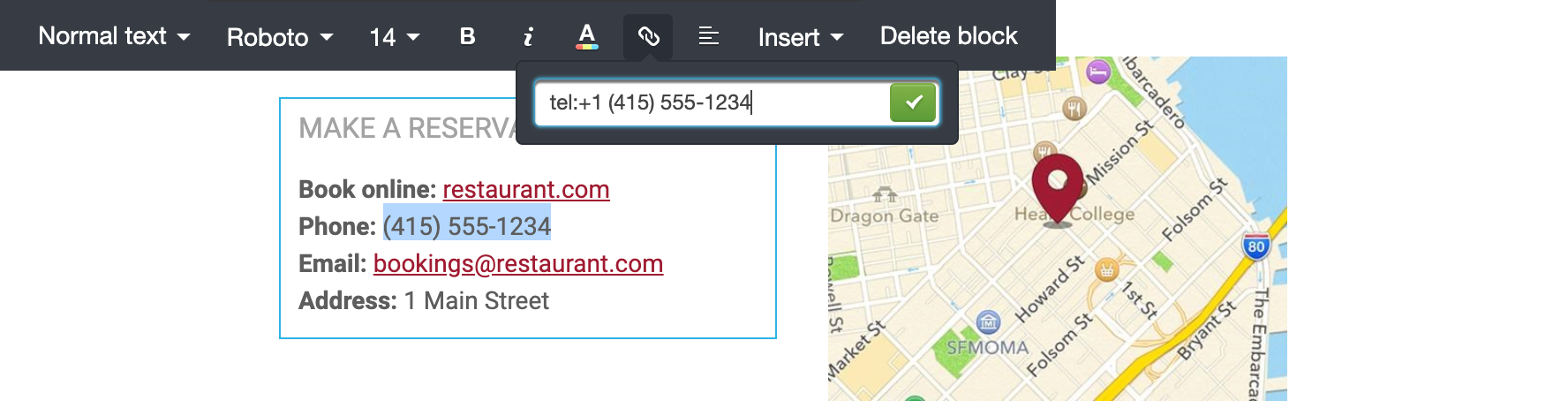
Then enter tel: or sms: in the input field, followed by the phone number. Remember to include the country code prefix to ensure the call or SMS is routed to the correct phone number.